A slide table that begins to hesitate at the end of travel rarely fails without warning. Cycle time may stretch by fractions of a second, the carriage may stop short under load, or an end-of-stroke impact may become noticeably sharper. In automated assembly, packaging, and material-handling cells, those small changes can quickly become rejected parts, sensor faults, and unplanned downtime. Effective pneumatic slide table maintenance is how maintenance teams catch the change before it becomes a production event.
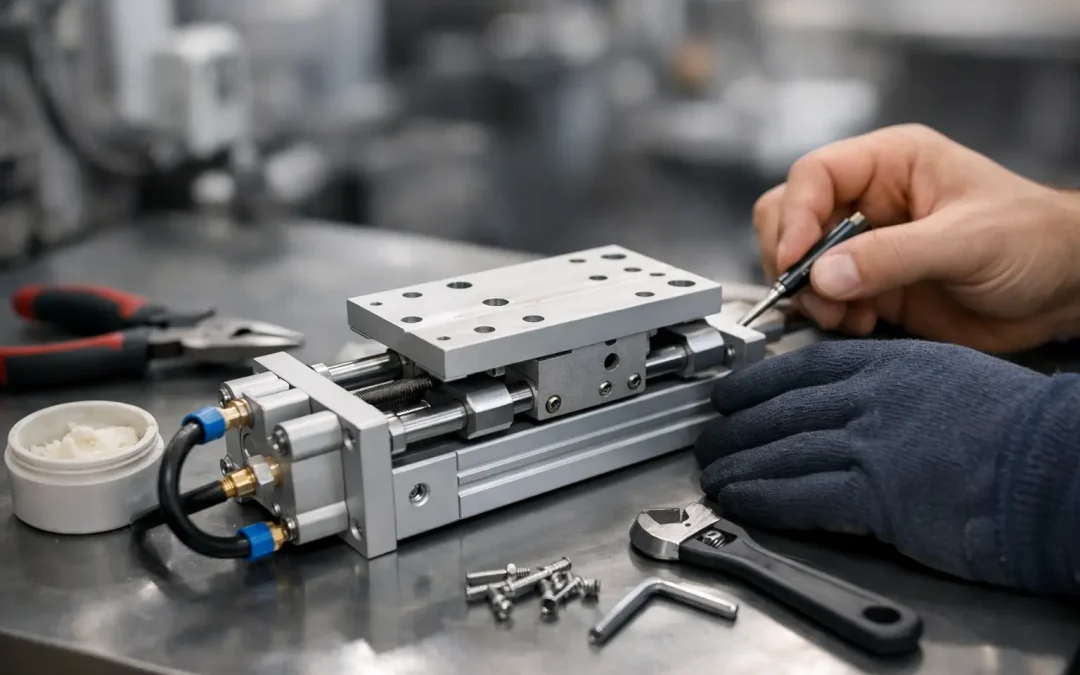
Unlike a basic air cylinder, a slide table combines pneumatic force with guided linear motion. The cylinder, guide rails, bearings, seals, end stops, mounting surface, and load alignment all affect performance. Treating it as only an air actuator leads to a common mistake: replacing seals when the actual cause is side loading, contamination, or a damaged guide.
Start With Motion Quality, Not Just Air Leaks
A useful inspection begins with the table operating at its normal production pressure, speed, and load. Jog it through several cycles and watch the carriage rather than relying only on sound. A healthy unit moves consistently, reaches both positions without bounce or hesitation, and holds its intended position without creeping.
Look for changes in extension and retraction speed, especially when one direction is slower. That can point to restricted exhaust flow, a clogged silencer, a sticking valve spool, or increased friction in the table. If both directions have become slow, verify pressure at the actuator while it is moving. A regulator set correctly at idle does not prove the table is receiving adequate pressure during a high-flow cycle.
Listen for leakage at ports, fittings, valve connections, and the cylinder body. A small leak may not stop the machine today, but it increases compressor demand and can create inconsistent force at the worst point in the cycle. Use an approved leak-detection method rather than relying solely on hearing in a noisy plant.
Check Repeatability at the Work Point
For precision applications, inspect the position that matters to the process, not only the end of travel. A slide table may fully stroke yet still place a gripper, fixture, or part outside tolerance because of guide wear, loose mounting hardware, or an external stop that has shifted.
Place a dial indicator at the tooling point and check for vertical, lateral, and rotational movement with the carriage at the working position. Compare the result with the machine’s acceptable tolerance or a known-good unit. Excess play often signals bearing or guide wear, but first rule out loose payload tooling and mounting bolts. Replacing a slide table will not correct a fixture that is flexing.
Pneumatic Slide Table Maintenance: The Core Inspection Routine
The correct service interval depends on cycle count, contamination exposure, side load, operating speed, and the cost of downtime. A clean assembly cell running moderate cycles may need a scheduled monthly visual inspection and a more detailed quarterly check. A welding, machining, food processing, aggregate, or outdoor environment may justify weekly attention.
A practical routine should cover these areas:
- Air quality: Drain filter bowls as required, inspect filter elements, confirm regulator stability, and verify that lubricators are used only where the actuator design and manufacturer guidance allow them. Water, compressor oil carryover, and abrasive debris shorten seal and valve life.
- Guide condition: Inspect rails, rods, bushings, and bearing surfaces for scoring, corrosion, metal particles, or dried lubricant. Clean exposed surfaces using materials compatible with the table and its seals.
- Fasteners and alignment: Check table mounting bolts, payload fasteners, shock absorber mounts, and sensor brackets. Verify that connected tooling does not force the carriage to travel out of plane.
- Pneumatic connections: Inspect tubing for abrasion, kinks, hard bends, and loose push-to-connect fittings. Confirm that flow controls are installed and oriented for stable meter-out speed control where the application requires it.
- End-of-stroke control: Check cushions, external shock absorbers, and mechanical stops for damage or adjustment drift. A table that slams at stroke end transfers impact directly into bearings, mounts, and attached tooling.
Document what you find. Recording pressure, cycle count, observed play, speed adjustments, and replaced components creates a service history that helps distinguish normal wear from a recurring design problem.
Lubrication Requires Restraint
More grease is not automatically better. Some slide tables use sealed, pre-lubricated bearings and should not receive routine external lubrication. Others require a specified grease type and interval. Applying the wrong lubricant can attack seals, attract abrasive dust, or create drag in low-temperature applications.
Follow the equipment documentation for lubricant specification and quantity. If documentation is unavailable, identify the bearing and guide style before adding anything. Wipe away old contaminated lubricant rather than forcing fresh grease over debris. For exposed guides in dirty service, a short cleaning interval is often more valuable than a heavy lubricant application.
Diagnose Common Failures Before Replacing Parts
When a slide table sticks or loses repeatability, the fastest path is not always to replace the actuator. Separate air-supply faults from mechanical faults. Disconnect the external load only when the machine can be made safe and the test is appropriate. If the unloaded carriage moves smoothly but binds with the tooling installed, the root cause is likely alignment, payload weight, cable drag, or a side load.
Slow or Uneven Travel
Check supply pressure at the valve and then at the actuator during motion. Inspect flow controls, silencers, tubing diameter, and valve flow capacity. An undersized valve or long restrictive tubing run can limit exhaust and make a table appear mechanically worn.
If air delivery is confirmed, inspect guides for contamination or damage. A bent mounting surface or payload bracket can create friction that changes through the stroke. This often produces a table that moves normally near one end but hesitates near the other.
End-of-Stroke Impact or Bounce
A hard impact may be caused by excessive flow, failed cushioning, worn shock absorbers, or an increased load. Adjust speed gradually and verify whether the table’s internal cushions are properly set. Do not use a mechanical stop as the primary deceleration method unless it was designed for that duty.
If a table bounces after contacting a stop, the problem can also be structural. Loose fasteners, flexible brackets, and unsupported overhung loads store energy and release it back into the system. Reducing air pressure may hide the symptom while sacrificing force and cycle consistency.
Drift, Lost Position, or Poor Sensor Indication
Pneumatic actuators are not inherently rigid position-holding devices. Pressure changes, external force, seal bypass, and valve leakage can allow movement. If a carriage drifts under load, verify whether the application needs a mechanical lock, rod lock, external clamp, or positive stop instead of relying on trapped air.
For sensor-related faults, inspect the sensor bracket first. A sensor that has shifted a few millimeters can create intermittent PLC alarms even when the slide table is mechanically healthy. Confirm magnet condition where applicable, cable integrity, sensor voltage, and the actual target position. Avoid adjusting sensors to compensate for a carriage that no longer reaches its intended stop.
Protect the Table From Application-Induced Wear
Most premature slide-table failures are caused by conditions outside the table itself. Side loading is a major example. A slide table may have adequate thrust to move a payload, yet the payload center of gravity may sit too far from the guide centerline. The result is elevated moment load, bearing wear, and declining repeatability.
Review payload mass, stroke speed, acceleration, and overhung dimensions when servicing a repeatedly failing unit. Cable carriers, vacuum hoses, and pneumatic tubing also deserve attention. Poorly routed utilities can pull on the carriage during travel and create a fault that appears only at certain positions.
Contamination control matters just as much. Use appropriate guarding, wipers, covers, or mounting orientation when chips, weld spatter, washdown, dust, or abrasive media are present. Stainless air preparation components and properly selected filtration can be worthwhile in corrosive or wet service, but they do not replace protection at the motion component itself.
Stock the Parts That Keep Production Moving
For critical stations, identify the components that can stop the cell: the slide table, directional valve, sensors, flow controls, shock absorbers, tubing, fittings, and air-preparation elements. Keeping the right spare is more effective than storing a generic cylinder that does not match the footprint, stroke, guide capacity, or sensor arrangement.
When replacement is necessary, confirm bore, stroke, mounting pattern, guide type, allowable load and moment, port size, sensing requirements, and operating environment. A factory-direct supplier such as VidoAir can help match standard or configured slide-table solutions when a direct replacement is unavailable or the application needs a higher-capacity design.
The best maintenance result is not simply a cleaned actuator. It is a slide table that reaches the work point accurately, decelerates without impact, and runs within a documented operating window. Build inspections around those outcomes, and maintenance becomes a direct tool for protecting throughput.